












Vyhledejte odpovědi pomocí vyhledávacího pole níže.
Creating Tools
Create from DXF
To create a custom tool from a DXF file then you can start with a DXF file of an existing tool which the following document highlight’s a typical example that is the same process for standard Punch, Die and Tool Holders.
Go into the Bend Tool Inventory (Factory, Edit, Bend Tool Inventory..) and find a similar tool and export it as a DXF file by clicking on the Akce button and selecting export DXF.
Open the exported DXF file.
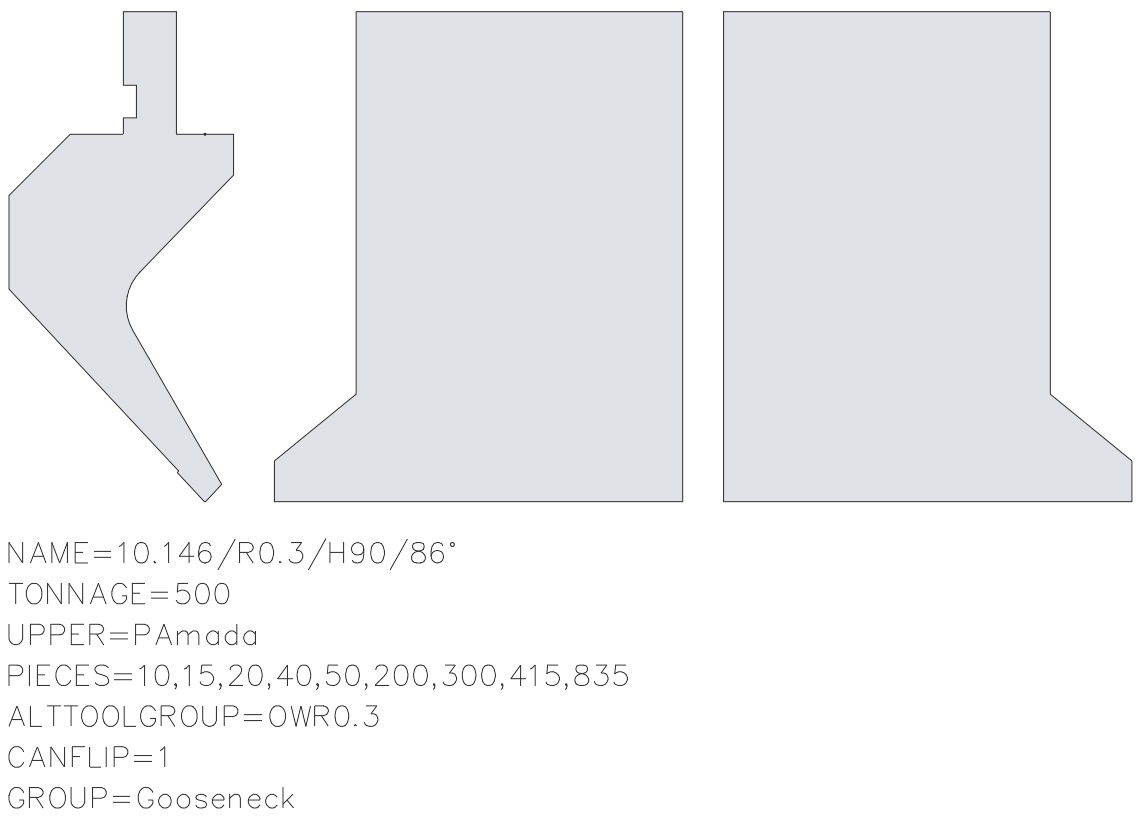
Edit the DXF file to adjust to the specifications of the new tool.
The DXF file must contain the following:
- A closed form (of lines, arcs, polylines) shows the side profile of the tool. In the drawing, this form must be at the closed polyline that is furthest to the left.
- A point which marks the reference point of the tool. This point must be located somewhere inside the polyline of the closed profile and indicates the point from which the height of the tool is measured.
- A front view is required for each tool which is not a simple rectangle in the front. These are typically left or right-horn tools but can also be user-defined tools.
- Each front-view drawing must appear on the right-hand side next to the sectional drawing, be horizontally aligned and have the same height as the sectional drawing. Currently, only the horn view is supported.
- Additional information about the tool is displayed using text strings. See below to view the text strings that are recognized.
Main Text Strings
The tool import will read certain text-based parameters to help identify the tool type, load and parameters which will differ between different tool types.
Example:
- NAME=XXXX – XXXX Specifies the tool name; this is required.
- TONNAGE=800 – Specifies the maximum load of the tool in kN/m; this is required to avoid showing incorrect tool overload errors.
- UPPER=PAmada– Specifies the connection type of the upper tool to the press beam.
- LOWER=DTrumpf – Specifies the connection type of the lower tool; the following connection types are supported: DTrumpf, DAmada30, DAmada60, DAmadaF, DAmada2V, DAmadaQuick, DAmada90, DEHT and DAmada120.
- PIECES=2×25,30,45,50,2×100,200,4×500 – This specifies the standard quantity for this tool, whereby the quantity for the left and right horn tools are defined by their sectional drawing.
Import Tool
Once the tool is drawn and saved as a dxf then it can be imported directly by accessing the Bend Tool Inventory and clicking Akce and selecting import from DXF.