











Potrzebujesz pomocy?
Szukaj odpowiedzi, korzystając z poniższego pola wyszukiwania.
-
O
-
Instalacja
-
Interfejs użytkownika
-
CAD CAM
-
-
Bochu HMI
-
Informacja o wydaniu oprogramowania
Wszystkie tematy
Laser Tool Editing
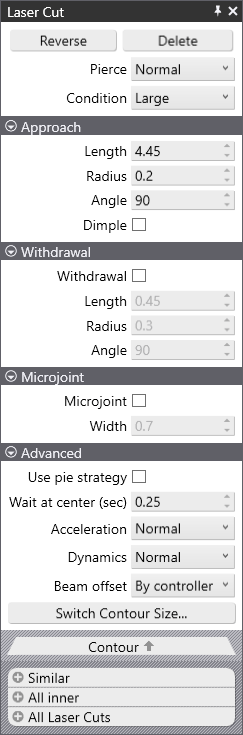
Laser Cut
- Reverse will flip the cutting direction of the selected item.
- Delete will delete the tooling for the selected item.
- Pierce will allow you to choose a different pierce type from an available list for the selected item.
- Condition will allow you to choose a different cutting condition from an available list for the selected item.
Podejście
- Length is the distance from the start of the cut to the contour being cut.
- Radius is the approach radius of the cut which can override the approach length.
- Angle is the approach angle from the start of the cut to the contour being cut.
- Dimple is for improving production accuracy without additional tooling and is automatically calculated based on the thickness of the material.
Withdrawal
- Withdrawal if checked will extend the withdrawal / escape from the contour being cut.
- Length will set the total length of the withdrawl.
- Radius will set the radius of the withdrawl.
- Angle will set the angle of the withdrawal.
Microjoint
- Microjoint if checked will add a microjoint to the end of the cut.
- Width will set the length of the cut.
Advanced
- Use pie strategy
- Wait at center (sec)
- Acceleration
- Dynamics
- Beam Offset
- Switch Contour Size
Contour
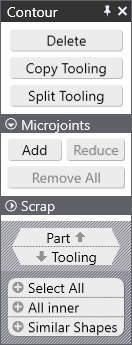
Contour
- Delete
- Copy Tooling
- Split Tooling
Mikroprzedziały
- Dodaj
- Reduce
- Remove All
Scrap
- Part
- Narzędzia
Both Dialogs have options for the following:
- Select All
- All Inner
- Similar Shapes
Spis treści