












Need Some Help?
Search for answers using the search box below.
-
About
-
Installation
-
User Interface
-
CAD CAM
-
-
Bochu HMI
-
Software Release Notes
< All Topics
Adding a Tool Station
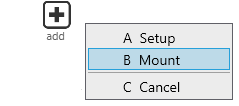
To add a new Tool Station to a bend operation, follow these next steps.
- Firstly, navigate to the bend view page, then select the Add icon which is found on the left side column of options.
- Select Mount from the shown list or use the shortcut key B.
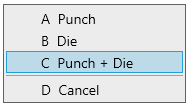
- Again, from the options available choose the desired tool to add.
- Punch – One upper tool will be set up.
- Die – One lower tool will be set up.
- Punch + Die – One upper and lower tool will be set up.
- Cancel – This will cancel the addition of a new tooling station.
Table of Contents