












Need Some Help?
Search for answers using the search box below.
Bend Deductions
Scenarios
Own bend deductions can be manually entered or imported into this screen.
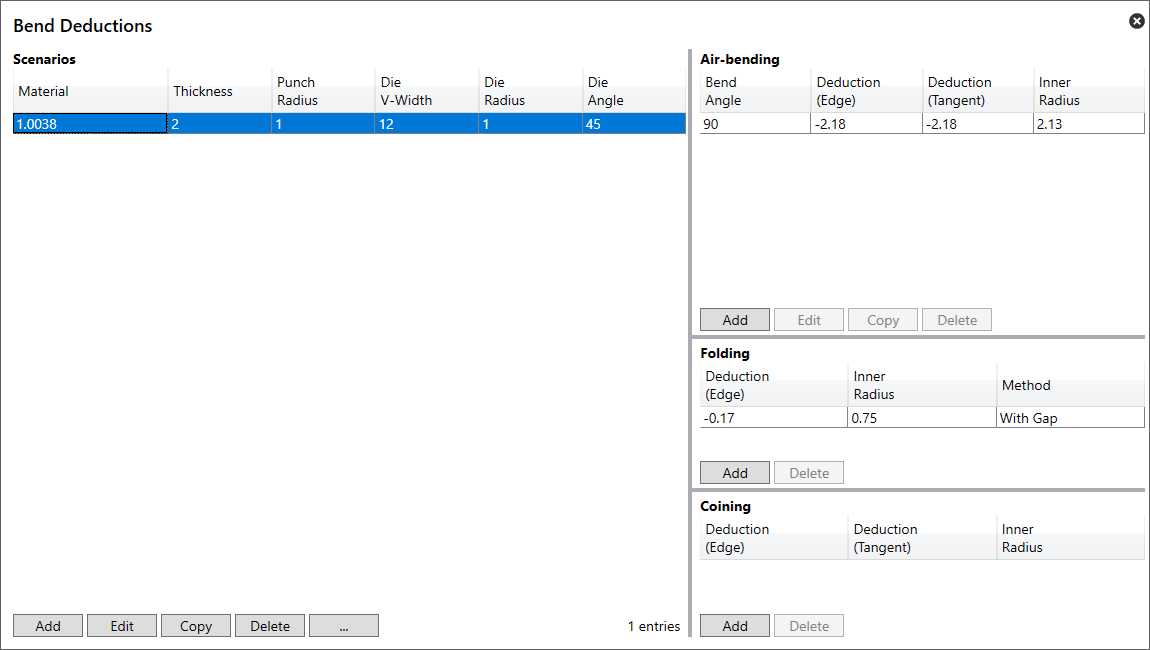
- Material – Displays the material for which the scenario applies.
- Thickness – Displays the thickness of the sheet to which the scenario applies.
- Punch Radius – Displays the upper tool radius for which the scenario applies.
- Die V Width – Displays the lower tool width for which the scenario applies.
- Die Radius – Displays the lower tool radius for which the scenario applies.
- Die Angle – Displays the lower tool angle to which the scenario applies.
- Add – Use this switch to add a Scenario.
- Edit – Use this switch to allow editing of the selected scenario.
- Copy – This will copy the information of the selected scenario, allowing editing and adding as a new scenario.
- Delete – This option will delete the selected scenario.
- … – Gives 4 extra options:
- Graph… – Displays the Deduction graph screen.
- Reset – This will delete all custom bend deduction data.
- Import… – Bend deductions can be imported here using a CSV file.
- Export… – Bend deductions can be exported here using a CSV file. This does not work with Trumpf bend deductions.
Air Bending
To add bend deductions for air-bending to a scenario, select the scenario that the deduction will apply. This will highlight the Add switch.
- Bend Angle – Displays the bending angle for the bend deduction.
- Deduction (Edge) – Displays the bend edge deduction for the selected scenario.
- Deduction (Tangent) – Displays the tangent bend deduction for the selected scenario.
- Inner Radius – Displays the inner radius set for the selected scenario.
- Add – Use this switch to add a bend deduction.
- Edit – Use this switch to allow editing of the selected bend deduction.
- Copy – This will copy the information of the selected Air-bending deduction, allowing editing and adding as a new deduction.
- Delete – This option will delete the selected deduction.
Folding
- Deduction (Edge)
- Inner Radius
- Method
Coining
To add bend deductions for coining to a scenario, select the scenario that the deduction will apply. This will highlight the Add switch.
- Deduction (Edge) – Displays the bend edge deduction for the selected scenario.
- Deduction (Tangent) – Displays the tangent bend deduction for the selected scenario.
- Inner Radius – Displays the inner radius set for the selected scenario.
- Add – Use this switch to add a bend deduction.
- Delete – This option will delete the selected deduction.